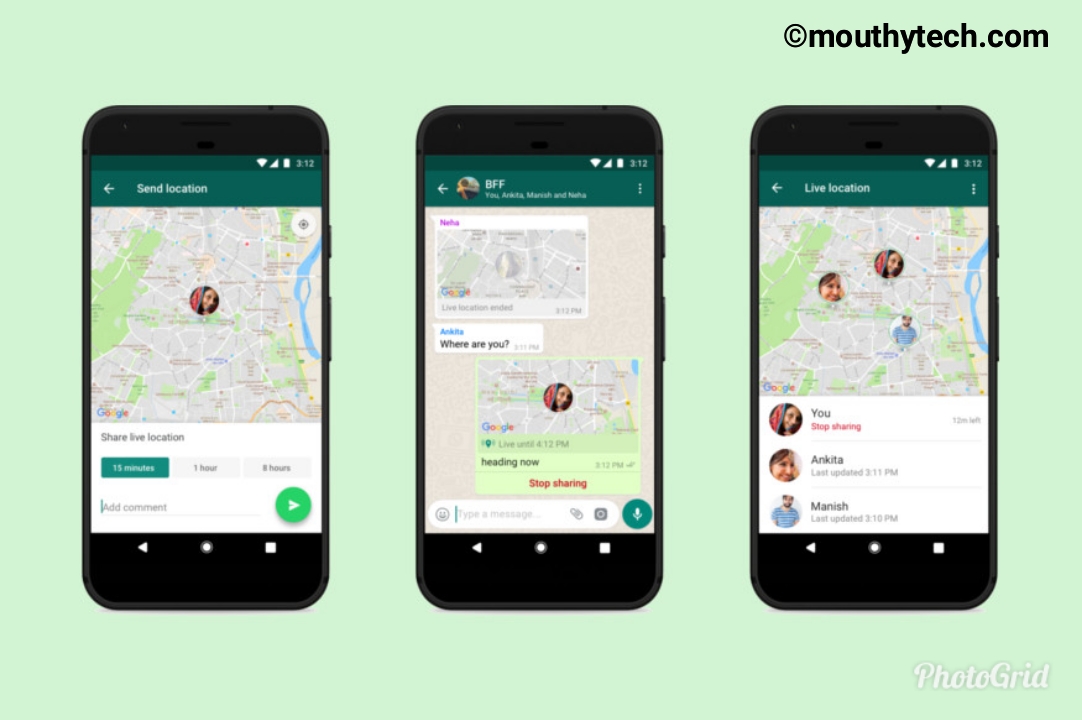
WhatsApp set to unveil a new feature that permits you to share your location in real time with friends and family. Definitely, this will give you another cause to keep coming back to the app many times a day.
Whatsapp
This implies you can share your location in a one-on-one conversation or in group chat. The main difference with this live location sharing is that it changes and updates your location in real time.
Read Also: How Whatsapp Helps Students.

How To Share Your Live Location

1. Open a chat with someone or group you want to share your location with.
2. Tap the attach icon, under “location” there is a new option to “share live location“.
3. Choose the duration you want to share your location and tap send
This will permit each person in the chat to know your location on a map. This feature will let people keep in touch with their friends and families.
According to Whatsapp, this feature will be rolling out to both Android and iOS users in days to come. so get ready to update your WhatsApp and start sharing your location.

No se limite a leer el artículo. me gusta, comentar y compartir 👍
WhatsApp set to unveil a new feature that permits you to share your location in real time with friends and family. Definitely, this will give you another cause to keep coming back to the app many times a day.
Whatsapp
This implies you can share your location in a one-on-one conversation or in group chat. The main difference with this live location sharing is that it changes and updates your location in real time.
Read Also: How Whatsapp Helps Students.

How To Share Your Live Location

1. Open a chat with someone or group you want to share your location with.
2. Tap the attach icon, under “location” there is a new option to “share live location“.
3. Choose the duration you want to share your location and tap send
This will permit each person in the chat to know your location on a map. This feature will let people keep in touch with their friends and families.
According to Whatsapp, this feature will be rolling out to both Android and iOS users in days to come. so get ready to update your WhatsApp and start sharing your location.

No se limite a leer el artículo. me gusta, comentar y compartir 👍
Mouthytech
Tech Cómo-Tos, Tutoriales e información

Whatsapp lanza en vivo para compartir la ubicación: Así es como funciona.

31
WhatsApp set to unveil a new feature that permits you to share your location in real time with friends and family. Definitely, this will give you another cause to keep coming back to the app many times a day.
Whatsapp
This implies you can share your location in a one-on-one conversation or in group chat. The main difference with this live location sharing is that it changes and updates your location in real time.

How To Share Your Live Location

1. Open a chat with someone or group you want to share your location with.
2. Tap the attach icon, underlocationthere is a new option toshare live location“.
3. Choose the duration you want to share your location and tap send
This will permit each person in the chat to know your location on a map. This feature will let people keep in touch with their friends and families.
According to Whatsapp, this feature will be rolling out to both Android and iOS users in days to come. so get ready to update your WhatsApp and start sharing your location.

No se limite a leer el artículo. me gusta, comentar y compartir 👍

Recibe actualizaciones en tiempo real directamente en su dispositivo, Suscríbase ahora.

Deja una respuesta

su dirección de correo electrónico no será publicada.